Handling of files

Storing files

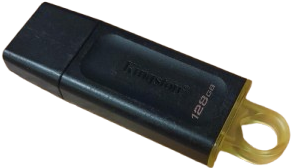
A Kingston 128 gigabyte large USB stick.

Pros

  • Hard to damage
  • Easy to transport
  • Usually a fair amount of space for the price
  • Very often accessible (doesn't require internet or specific computer)

Cons

  • Easy to lose because of size
  • Cost
  • Manual (saving files, moving them to the usb, safely ejecting, plugging out the USB)
A simple cloud icon.

Pros

  • Automatic backup (most commonly)
  • Easy to transfer/share files (most programs use clouds to remember files you send)
  • Very common (a LOT of programs have some sort of cloud)

Cons

  • Storage space (often not as much as hard drives/USB sticks/flash drives)
  • Subscriptions (usually required for better cloud storage)
  • Requires internet connection
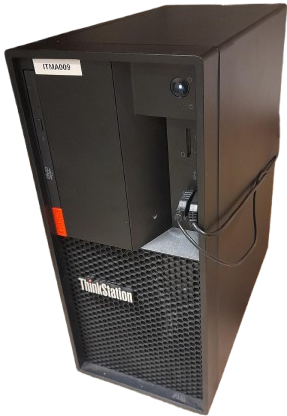
A stationary computer.

Pros

  • Incredibly safe
  • A lot of space (usually more so than USB sticks/flash drives)
  • Always accessible with the corresponding computer

Cons

  • Difficult to transfer files without cloud or USB sticks/flashdrives
  • Price escalates with storage space and speed
  • Not easily transportable

While most of these storage types are viable, the most common one without a doubt is the cloud. Most apps have some sort of cloud storage, like social media platforms, more professional companies like Office 365 and Adobe, or even simple stuff like snapchat. This is because to send someone else a file, they must access it. Meaning that they can't access it if it's saved on your hard drive, consequently causing a need for cloud-based services to store files so that others can also see and access them. However, a lot of programs that include cloud-based storage, also provide a way to save files onto your hard drive or USB-stick/flashdrive. This is very useful, since having everything on the cloud isn't always the wisest option in the world, and even if you did put every single thing you saved into a single cloud, you'd most likely run out of space anyways.

Moving files

A Kingston 128 gigabyte large USB stick.

Pros

  • Hard to damage
  • Easy to transport
  • Usually a fair amount of space for the price
  • Very often accessible (doesn't require internet or specific computer)

Cons

  • Easy to lose because of size
  • Cost
  • Manual (saving files, moving them to the usb, safely ejecting, plugging out the USB)
A simple cloud icon.

Pros

  • Automatic backup (most commonly)
  • Easy to transfer/share files (most programs use clouds to remember files you send)
  • Very common (a LOT of programs have some sort of cloud)

Cons

  • Storage space (often not as much as hard drives/USB sticks/flash drives)
  • Subscriptions (usually required for better cloud storage)
  • Requires internet connection
A stationary computer.

Pros

  • Incredibly safe
  • A lot of space (usually more so than USB sticks/flash drives)
  • Always accessible with the corresponding computer

Cons

  • Difficult to transfer files without cloud or USB sticks/flashdrives
  • Price escalates with storage space and speed
  • Not easily transportable